
Take control of your Clan by utilizing our upcoming new Clan Roles!
In the next few weeks we'll be releasing an updating to Kingdoms at War that introduces a number of new roles to the existing clan structure. Each role will come with it's own specific set of abilities, and aims to make the work of clan management both easier and more transparent.

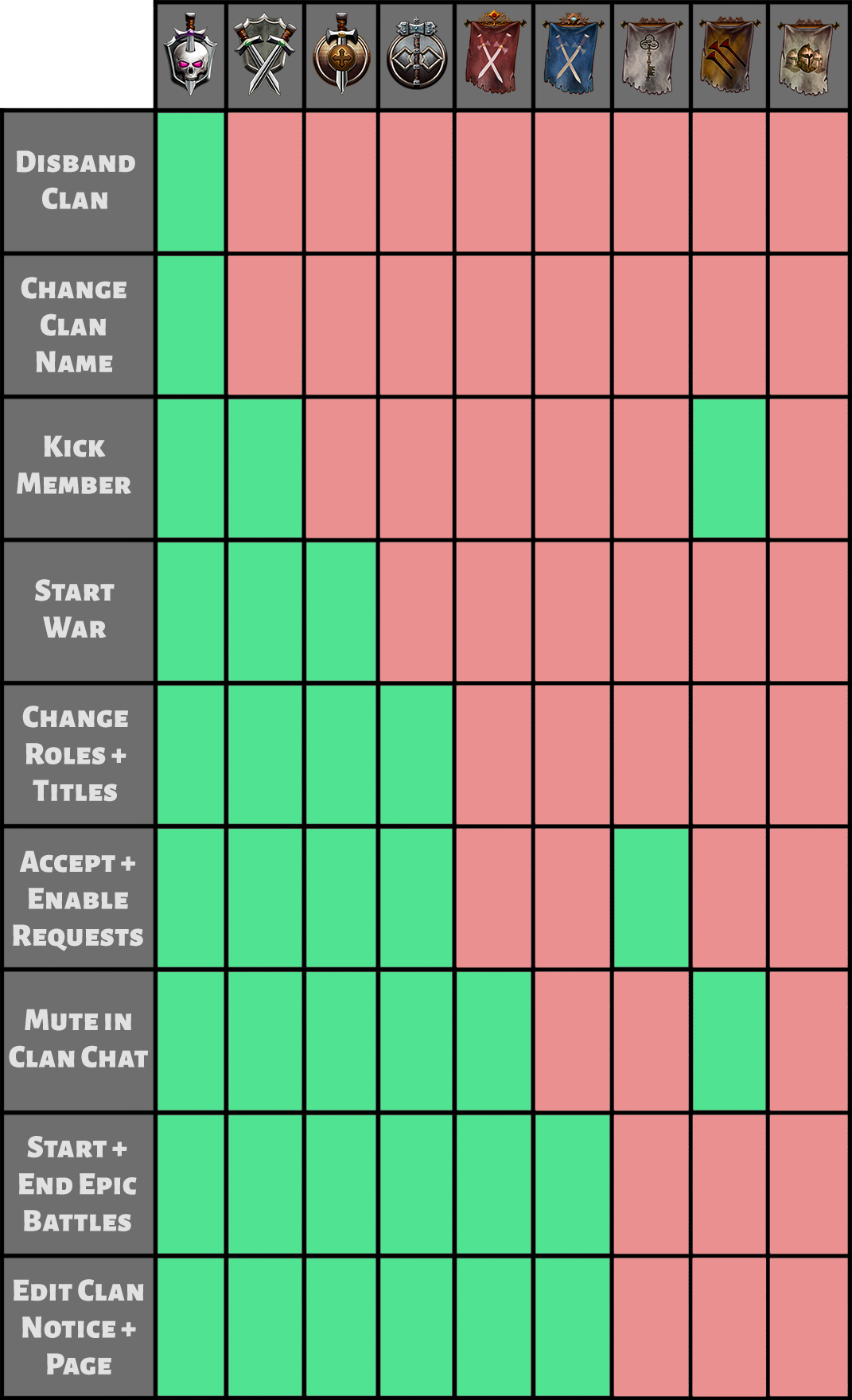
The Warlord role replaces the previous Clan Owner position. They have complete control over all Clan features, abilities, and member management.

The War Chief role replaces the previous Clan Admin position. They are able to Kick Clan Members, Start Wars, Change User Roles/Titles, Manage Clan Applications, Mute Members in Clan Chat, Start/Forfeit Epic Battles, and Edit Clan Notices + Clan Page.
Commanders are able to Start Wars, Change User Roles/Titles, Manage Clan Applications, Mute Members in Clan Chat, Start/Forfeit Epic Battles, and Edit Clan Notices + Clan Page.
Armsmasters are able to Change User Roles/Titles, Manage Clan Applications, Mute Members in Clan Chat, Start/Forfeit Epic Battles, and Edit Clan Notices + Clan Page.
Captains are able to Mute Members in Clan Chat, Start/Forfeit Epic Battles, and Edit Clan Notices + Clan Page.

Knights are able to Start/Forfeit Epic Battles, and Edit Clan Notices + Clan Page.
Recruiters are able to Manage Clan Applications.
Chargehands are able to Kick Clan Members and Mute Members in Clan Chat.
Soldiers are the base role in a Clan, and act simply as regular members with no set abilities.
Note: Specific actions can only be taken against Clan Members of a rank lower than your own
This is a new feature being added with the Clan Role update that allows a clan to change their Clan Name for 100 Nobility Points
Note: When you change your clan name, the existing name will be available for anyone to claim.
This is another new feature being added with the Clan Role update that allows those with the appropriate abilities to Mute specific players from posting in Clan Chat for ONE HOUR. Muting players is done in the Clan Management member list.
When this transition to the new Clan Roles system is implemented all members other than the Clan Owner will have their ranks automatically set to Soldier. Owners will then need to manually assign ranks to their members using the new Clan Roles.
If your clan does not have an active owner, players can follow the following procedure to appoint a new owner before the new clan roles go live:
For clans with fewer than 3 active admins:
For clans with no active admins:
In the next few weeks we'll be releasing an updating to Kingdoms at War that introduces a number of new roles to the existing clan structure. Each role will come with it's own specific set of abilities, and aims to make the work of clan management both easier and more transparent.
The Warlord role replaces the previous Clan Owner position. They have complete control over all Clan features, abilities, and member management.
Starting Slots: 1
Max Slots: 1
Slot Purchase Price: n/a
Max Slots: 1
Slot Purchase Price: n/a
The War Chief role replaces the previous Clan Admin position. They are able to Kick Clan Members, Start Wars, Change User Roles/Titles, Manage Clan Applications, Mute Members in Clan Chat, Start/Forfeit Epic Battles, and Edit Clan Notices + Clan Page.
Starting Slots: 1
Max Slots: 3
Slot Purchase Price: 1T Gold
Max Slots: 3
Slot Purchase Price: 1T Gold
Commanders are able to Start Wars, Change User Roles/Titles, Manage Clan Applications, Mute Members in Clan Chat, Start/Forfeit Epic Battles, and Edit Clan Notices + Clan Page.
Starting Slots: 1
Max Slots: 5
Slot Purchase Price: 500B Gold
Max Slots: 5
Slot Purchase Price: 500B Gold
Armsmasters are able to Change User Roles/Titles, Manage Clan Applications, Mute Members in Clan Chat, Start/Forfeit Epic Battles, and Edit Clan Notices + Clan Page.
Starting Slots: 0
Max Slots: 7
Slot Purchase Price: 100B Gold
Max Slots: 7
Slot Purchase Price: 100B Gold
Captains are able to Mute Members in Clan Chat, Start/Forfeit Epic Battles, and Edit Clan Notices + Clan Page.
Starting Slots: 0
Max Slots: 10
Slot Purchase Price: 50B Gold
Max Slots: 10
Slot Purchase Price: 50B Gold
Knights are able to Start/Forfeit Epic Battles, and Edit Clan Notices + Clan Page.
Starting Slots: 0
Max Slots: 10
Slot Purchase Price: 50B Gold
Max Slots: 10
Slot Purchase Price: 50B Gold
Recruiters are able to Manage Clan Applications.
Starting Slots: 0
Max Slots: 10
Slot Purchase Price: 50B Gold
Max Slots: 10
Slot Purchase Price: 50B Gold
Chargehands are able to Kick Clan Members and Mute Members in Clan Chat.
Starting Slots: 0
Max Slots: 10
Slot Purchase Price: 50B Gold
Max Slots: 10
Slot Purchase Price: 50B Gold
Soldiers are the base role in a Clan, and act simply as regular members with no set abilities.
Starting Slots: Unlimited
Max Slots: Unlimited
Slot Purchase Price: N/a
Max Slots: Unlimited
Slot Purchase Price: N/a
Note: Specific actions can only be taken against Clan Members of a rank lower than your own
Clan Name Change
This is a new feature being added with the Clan Role update that allows a clan to change their Clan Name for 100 Nobility Points
Note: When you change your clan name, the existing name will be available for anyone to claim.
Clan Chat Muting
This is another new feature being added with the Clan Role update that allows those with the appropriate abilities to Mute specific players from posting in Clan Chat for ONE HOUR. Muting players is done in the Clan Management member list.
Clan Role Reference Chart
Important Note Regarding Admins
When this transition to the new Clan Roles system is implemented all members other than the Clan Owner will have their ranks automatically set to Soldier. Owners will then need to manually assign ranks to their members using the new Clan Roles.
If your clan does not have an active owner, players can follow the following procedure to appoint a new owner before the new clan roles go live:
- Have 3 Admins leave feedback requesting a transfer of ownership and stating which player they would like ownership transferred to.
- Have 1 Clan Member email support@athinkingape.com informing us of this request, and list the names of Clan Members who have sent in feedback.
For clans with fewer than 3 active admins:
- All active admins must leave feedback requesting a transfer of ownership and stating which player they would like ownership transferred to.
For clans with no active admins:
- At least 50% of the active clan members must leave feedback requesting a transfer of ownership and stating which player they would like ownership transferred to.


