


Update: November 23, 2026
KAW Web Store: New Payment Provider
Starting today, the KAW Web Store will use Neon Pay as its payment provider instead of Xsolla. Only the checkout and payment processing are changing.
WHAT STAYS THE SAME
- Web Store website and link
- Offers and deals
- Reward points
- ATA ID login
WHAT'S CHANGING
- Checkout: The checkout pop-up has a new design.
- Saved cards: Cards saved with Xsolla don’t carry over. Re-enter your card on your first purchase and it will be saved for next time.
- Receipts: Receipts have a new format and are sent from support@neonpay.com.
- Bank statements: Purchases appear as “Neon Commerce.”
- Payment methods: Credit card, PayPal, Google Pay, Apple Pay, Klarna, Cash App and others, depending on your region.
Subscriptions
Web Store subscriptions stay with Xsolla and will keep renewing as normal. We’ll let you know ahead of time if this changes.
Missing a payment method?
Contact in-game support with the payment method and your region. We’ll pass requests to the team to consider for the future.
Need help?
Contact in-game support as usual for any Web Store purchase, from before or after the change. If an issue needs Neon Pay’s team, we’ll direct you to them.
Thanks for playing KAW and happy purchasing
 STILL HAVE QUESTIONS? READ OUR FAQ PAGE FOR MORE INFO

Kingdoms at War Web Store
What is it?
This is KAW's external store! We've been hard at work on new features so that we can offer new items, bundles, and discounts for YOU! You can purchase all the things you would in-game, but directly from us at a discount.

Here is the link!
https://shop.kingdomsatwar.com/
If you use iOS, you'll have to tap and hold the link.
Why should I use it?
 New Bundles!
 More Nobility Points!
 Discounts you can't get anywhere else!
 A wider range of offers and deals!
 AND Reward Points!
What are Reward Points?
All purchases in the KAW Web Store will include Reward Points (also known as RP)! for the
 Weekly Reward Points Event
As you collect RP on the KAW Web Store each week, you will earn extra rewards! And you earn progress on every purchase, no matter what you need!
The important thing is...
🛍Purchase on the Web Store!🛍

 Earn FREE rewards!
This rewards program will come with all sorts of valuable and collectible rewards. Including:
Nobility Points Health Crystals Victor's Keys
 Seals of the Damned
 Silver Bars
 Raven Bone Wind Chimes
 Aqua Inferno

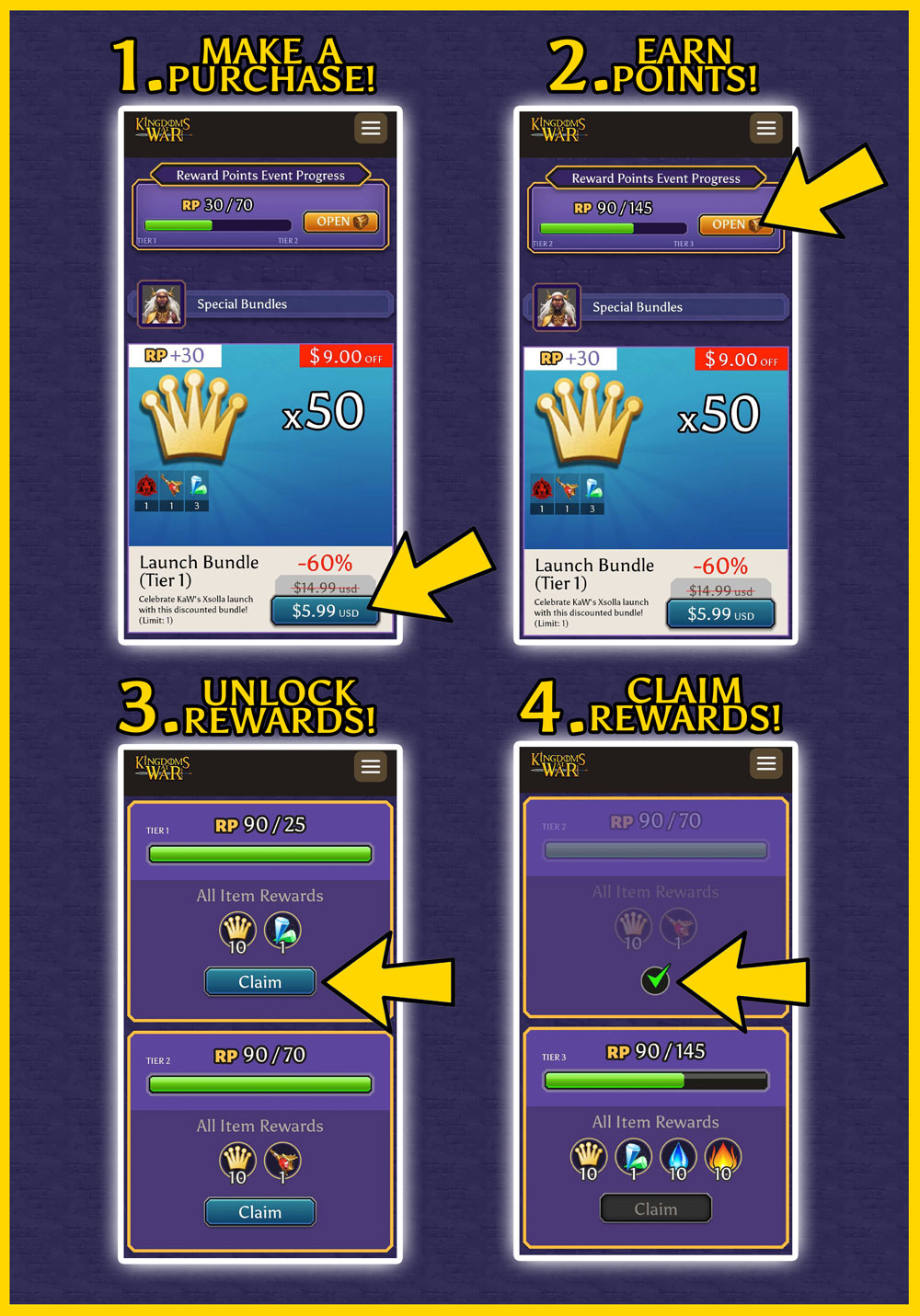
How can I get these rewards?
1. LOGIN
☞ Use the ATA ID and Password associated with your account to enable purchasing.
2. FIND A DEAL
☞ Go to the KAW Web Store and find something you like!
3. MAKE A PURCHASE
☞ Tap Buy Now and pick your Payment Method on the Payment Options page.
4. TRACK YOUR WEEKLY RP PROGRESS
☞ Each purchase includes Reward Points that can be tracked at the top of the Store. This progress resets each week!
☞ Points are cumulative throughout the week, so the current top tier requires 5000 points!
5. COLLECT FREE REWARDS
☞ Once you reach a reward tier, you can claim the rewards. They will be automatically added to your Reward Inbox in-game!

Why did you make it?
You deserve it! We wanted to be able to offer you even more rewards just for using the Web Store.
This latest version gives you more rewards, just for using the Web Store. So now you'll get even more rewards to go with your discounts!
More discounts!
More rewards!
More bundles!
What is Neon?
Neon is company that we have newly parternered with to run the KAW Web Store! You will see references to them in your email receipts and a few other places. If you need any help though, it is best to contact us with a Help Ticket in-game!
How do I get there?
The image at the top of this post and every mention of the KAW Web Store is a link!
If you want to double-check you are in the right place, the url is https://shop.kingdomsatwar.com/
How do I get help?
With the KAW Web Store we have way more tools at our disposal if you run into trouble! If you have any issues, write a Help Ticket in-game and we'll get you sorted.
You can also tap the 'Contact Us' button at the bottom of your receipt to get in touch with the Neon Support team directly!

What currency are these prices in?
The KAW Web Store will show prices in USD. Once you click Buy Now, the payment window will reflect the total price with your local currency and applicable taxes. Tap the total price to see your breakdown with taxes.
Do I have to make an account?
Nope, use your existing ATA ID and Password to login. Purchases made through the KAW Web Store will go directly to the account associated with your ATA ID.
Why can't I login with my password?
If you get an error message logging in, you may need a longer password. You can update your password in game or by following this link.
Why can't I login with my email link?
We do not have email link enabled for the KAW Web Store. You'll need to setup a password for your account by going here.
Why was my purchase cancelled?
There are a few reasons a purchase may get cancelled:
1. Incorrect payment details were entered.
Using the wrong expiry, cvv, billing address, name, etc. will stop your payment.
2. The purchase method you are using doesn't match your location.
If you are using a VPN it may give you some trouble at checkout, try turning it off while you purchase.
3. Your purchase triggered an Anti-Fraud measure.
This is normal with a new store and is to protect both you and us from fraud.

In each case, please wait a day before trying the same payment method again. In the meantime, feel free to try another payment method and you may get rewarded with extra perks like loyalty points or cash back!
Why can't I place a purchase in my region?
Some players may not be able to use the KAW Web Store based on where it detects they are located, this can often be due to the local rules or regulations. Currently, the KAW Web Store is not available in the following countries: Belgium, China, Japan, Netherlands, Slovakia, Serbia, South Korea, and Taiwan.
Check out the Web Store FAQ and Reward Points FAQ in the Help Centre for the answers to all your questions!
Last edited by a moderator:


